Networking
Introduction
In the space of just a few decades, computer networking has gone from being a curiosity involving screeching modems to being the primary reason for having a computer. Many modern laptops and smartphones aren’t much more than an interface to the Internet. Using a computer without an Internet connection feels so limited that it’s hard to believe that the first version of Windows 95 didn’t even ship with Internet Explorer!
A large amount of modern day software development involves at least some web work. For this reason, it’s absolutely critical that you have a firm understanding of computer networking, the Internet and the associated web technologies. In this chapter we’ll develop a conceptual model of networking using stacked layers of protocols. We’ll then use that model to study the Internet, its major protocols and the web.
What is a network?
Let’s begin by getting our terminology straight. Computers can be connected together to form a network. A host is any device connected to a network. Hosts on a network are able to exchange information. The network might involve physical connections using cables (so retro!) or, more likely these days, wireless connections using WiFi or Bluetooth. Either way, there will be a component in each host known as the network interface card (NIC) that is responsible for encoding and decoding messages to and from whatever physical signals the network uses.
If you want to call someone, you need to know their phone number. It uniquely identifies the phone you’re calling out of all of the phones connected to the phone network. It’s the same for computer networks. Each host on the network has a unique identifying address determined by the NIC. One host can talk to another by using its NIC to broadcast across the network a message addressed to the NIC of the receiving host. The receiving host’s NIC will listen to all the messages on the network. Whenever it detects a message addressed to it, the NIC will excitedly read the message into the computer’s memory and notify the OS using the interrupt system we saw in the OS chapter.
If a network only allows machines to communicate with other machines on the same network, then it is referred to as an intranet because all of the communication stays within (intra) the bounds of the network. Lots of businesses run their own private intranets, accessible only to computers within the office, to share access to storage, printers and so on.
Some networks include machines that are connected to more than one network. Such machines can be configured to function as routers by accepting messages from a host on one network and passing it on to a host on another network. This enables inter-network communication. A message from a sender in one network can reach a receiver in another network even though there is no direct connection between the sender and receiver.
The Internet, with a capital I, is one single, planet-wide inter-network of networks. Any two points on the Internet can communicate with each other by sending a message across their own little sub-network to a router, which sends it across another sub-network to another router and so on across successive sub-networks until the message reaches the destination’s sub-network and can find the destination machine.
Once the bits have arrived at their destination, whether via an intranet or the Internet, the receiver has to be able to correctly interpret them. We use protocols to specify the format of information that’s sent from machine to machine. The Internet is based on a bundle of protocols known as TCP/IP, clever routing algorithms and systems for managing and retrieving device addresses. We will look at all of these in this chapter.
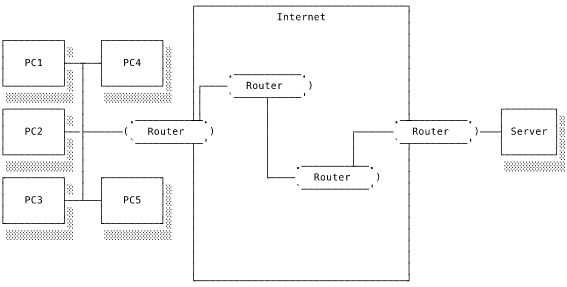
In this diagram we have an intranet on the left. One host on the intranet, the router, also has a connection to the Internet, most likely provided by an internet service provider (ISP). There is a path through the Internet routers to the server, which exists on a separate intranet with just its own router for company. The PCs and servers might be on opposite sides of the world.
Messages are not sent in a single burst but are split into chunks known as packets. Each packet is sent independently of the others and may take a different route depending on network congestion and availability. The Internet is designed, in theory at least, to be decentralised. No single person or body controls the Internet. It is also designed to be resilient. If a node on the network – one of these machines straddling multiple sub-networks – fails for whatever reason, the network traffic will automatically find another route to its destination. It also improves the network’s utilisation by encouraging each packet to find the fastest route. A physical analogy would be a convoy of cars all heading from one place to another. If a car ahead gets stuck in traffic the cars behind can try taking a different route in the hope of avoiding the congestion.
The Internet forms a reliable communication layer on top of which various “applications” have been built. I don’t mean applications in the sense of desktop applications. Internet applications are closer in meaning to use cases for the Internet. Lots of things that you might think of as “the Internet” are actually applications in this sense. Email is a collection of protocols which enable electronic messages to be sent across the network. Another, known in the 1990s as the World Wide Web and now just the web, allows users to request and receive multimedia content. I’m pushing things here, but the Internet is a little like an operating system for networks. It provides a way to reliably and consistently get a message from A to B across diverse networking machinery, just as an OS reliably and consistently runs programs on many disparate computer architectures. You don’t need to worry about how your message is delivered because the Internet handles all of that for you.
In non-technical use, the Internet and the web are basically synonymous. This is because the web has become by far the most dominant application on the Internet. Despite this, it’s important to remember that the Internet and the web are not the same thing. The Internet is a communication layer that enables devices to talk to each other across network boundaries. The web is just one of many uses we have found for the Internet. The Internet predates the web by several decades.
By this point you may be wondering what exactly a protocol is. Can it be found somewhere in your computer? How does it actually do anything? How does the computer know that this huge stream of incoming bits should be interpreted with this or that protocol?
Cast your mind back to how the processor decodes instructions. How did the processor “know” that a particular bit pattern corresponds to a particular instruction? It didn’t, really. The humans who designed the processor imposed meaning by designing the processor’s decoding circuitry in a particular way. The processor is blindly operating according to its design and it relies on the incoming instructions being encoded as expected. The processor’s instruction set architecture forms a protocol between the programmer and the processor: give me an instruction in this format and I’ll execute this behaviour.
A protocol is a set of rules and expectations specifying how data should be transmitted. The target of a protocol is really other people. They’re the ones who will sit down and program their computers to interpret the bitstream you’re sending according to the agreed protocol. As long as every machine follows the protocol correctly, everything will work as desired. Everyone will agree which meanings should be assigned to which bits. The computer doesn’t “know” that the incoming communication is using a particular protocol. It merely attempts to interpret it according to whatever protocol the programmer has instructed it to use. It will happily try and interpret a message with an incorrect protocol if you tell it to do so.
The Internet is on a vastly different scale to the gates and components we’ve looked at in previous chapters. Performance costs that were almost infinitesimally small on the scale of an individual computer suddenly matter very much when we’re working on the scale of a planet.
From the processor’s perspective, it takes an extremely long time for messages to traverse the Internet. Network requests are slower than local, system requests by several orders of magnitude. Latency measures how long it takes a message to reach its destination. A certain, unavoidable amount of latency is due to the time it takes the message to travel across the Earth. Additional latency can be added by the performance of the machines along the message’s path through the network. Latency is usually measured in milliseconds and lower is better. As a rough estimate, it takes 150ms for a message to go from London to San Francisco. That is thousands of times slower than a local memory access.
The other important performance consideration is how much data can fit into the network’s piping at once. This is known as the bandwidth. Clearly, if we can transmit more bits of data at once, then we can transmit a message more quickly. Bandwidth is measured in bits per second and higher is better. In my lifetime we’ve gone from a humble 56Kbps (kilobits per second) to megabits and now gigabits per second.
Both latency and bandwidth are important for performance but in different ways. If you want to transfer a lot of content (e.g. streaming video), then you’re interested in bandwidth. It doesn’t really matter whether it takes 50ms or 500ms for the first bit of content to reach you so long as the bandwidth is sufficient to keep the data buffers full and your video playing. If the network activity involves lots of round-trips, when the sender transmits something and waits for a response from the receiver, even fairly small changes in latency can have a large impact on the total transmission time. On the other hand, low latency won’t do us much good if a lack of bandwidth means we can only send a minuscule amount of data per second.
The networking stack model
The complexity of the Internet means that each message has to convey a lot of information. Let’s take the example of posting a comment on someone’s blog. So that your message can get to the right host and so that the receiving computer can know what the hell to do with it, your transmission’s packets will need to specify: the receiver’s network address; the application protocol; tracking information so that the complete transmission can be reconstructed; and the actual content of your comment itself.
As ever, when faced with great complexity, we can make it more manageable by breaking down the problem. The solution in networking is to layer multiple protocols on top of each other to create a network stack. Each layer has a different role. This modularisation creates a highly effective separation of concerns. The layer that’s responsible for delivering a message across a network is completely separate to the layer that routes the message between networks and that layer is different from the layer that instructs the receiver how to interpret the message.
There are two networking stack models that you will come across. The more general one is known as the OSI model (after Open Systems Interconnection, though you’ll never need to know that). It has seven layers. The simpler model is that of the Internet protocol suite, which defines how the Internet works. It has four layers that broadly correspond to specific OSI layers. We’ll focus on the Internet protocol suite’s stack model in the interests of simplicity.
| Internet layer | OSI number | Common protocols |
|---|---|---|
| Application | 7 | HTTP, SMTP, FTP |
| Transport | 4 | TCP, UDP |
| Internet | 3 | IP |
| Link | 2 | Ethernet |
The functionality of each layer is implemented by the various protocols that operate at that layer. At the heart of the communication is the payload: the actual message that you want to transmit. In this example it’s the blog comment you want to post. Each layer wraps around the content of the previous layer, including that layer’s metadata. It’s like the nested Russian dolls known as matryoshki.
Inside the complete chapter
What you’ll learn
- What is a network? Hosts, network interface cards, addressing, routers, and inter-networks
- The networking stack model Layered protocol stacks such as the OSI model and Internet protocol suite
- The Internet Protocol How IP routes packets across network boundaries using addresses and headers
- Transmission Control Protocol Reliable, ordered delivery of data streams built on top of IP
- Internet addressing and DNS IPv4, IPv6, network address translation, and the domain name system
- The web, hypertext and HTTP The request-response application protocol that powers the World Wide Web